
Pheidi swapped its homepage mockups for screenshots from its tests
Pheidi builds training plans for runners. Its homepage used to show the app through two pictures somebody made by hand. One was a PNG exported in May. The other was a calendar drawn in HTML and CSS. Both drifted away from the real app, and nobody noticed for months. Now both are screenshots the test suite takes on every merge, and they change when the app does.
Two placeholders, both wrong
The hero image was plan-ss-5-2026.png, a 209 KB screenshot exported in May 2026. Four months later it was still the first thing a visitor saw, and it showed a build of the app nobody was running any more. Nothing was broken, which is the problem. A stale PNG fails no test.
Further down, the section about calendar sync had a "This Week" card. It wasn't a screenshot. It was seven rows of HTML styled to look like the app, with its own colours and its own legend. Every time the app's workout colours changed, the mock had to be changed to match, by hand, in a different file.
It didn't keep up. In the mock, Long Run and Cross Training came out the same blue, and the legend was missing an entry. A fix went in to patch the colours. A retest on 21 October still couldn't tell the two apart. At that point patching the drawing again seemed pointless. The fix that can't drift is to stop drawing the week and show the app's own.
How Pheidi takes its screenshots
Pheidi already had end-to-end tests that sign in as a seeded runner and click through the app. One test class, DocsScreenshotTests, visits the screens worth showing and saves a PNG of each, at desktop size (1280×720) and phone size (375×667 at 2x). On every merge to master, screenery/push@v1 sends those files to Screenery. The job proves who it is with GitHub's OIDC token, so there is no Screenery secret stored in the repository.
Each screenshot has a permanent name, like plan/today, and the name is the URL:
https://cdn.screenery.dev/jfreal/pheidi/desktop/plan/today@latest.png @latest follows the default branch. A merge to master moves it, and a pull request can't. So the marketing site never holds an image. It holds a list of names.
That list is one file, public/_data/screenshots.js. Each entry has the screenshot name, real alt text, a caption and the doc page it belongs to. The docs pages embed an entry with one shortcode, {% screenshot "plan-today" %}, which writes a <picture> with both sizes and the width and height filled in.
| Where | How many |
|---|---|
| Screens captured on every merge | 15, each at desktop and phone size |
| Feature doc pages with a live figure | 13 |
| Homepage | 2: the hero and the calendar week |
| PNGs of the app committed to the site | 0 |
The hero
The hand-exported PNG came out and two Screenery URLs went in, the desktop and phone captures of the plan Overview. This is the desktop one, live:
The live screenshot did not load. cdn.screenery.dev/jfreal/pheidi/desktop/plan/overview@latest.png

The hero is the one image on the page that loads eagerly, because it is the largest thing on screen when the page opens. So the homepage writes that <img> out by hand instead of using the shortcode, which always loads lazily. The URLs and sizes still come from the same list, so a check that reads the list still covers it.
One thing we tried and dropped. Screenery serves the PNG it stored and doesn't resize it. A request with ?w=640 on the end answers 501 not_implemented, which an <img> shows as a broken image. Pheidi asks for the stored file at its stored size and lets CSS scale it. The desktop PNG is 117 KB and the phone one 78 KB, both smaller than the 209 KB export they replaced.
The calendar
The calendar was harder, and it's the more interesting half. A screenshot of the app's week view at the usual size shows two or three days. Seven day cards are about twice the height of a 720px screen. And the whole point of the section is to show a week with different kinds of run side by side.
The change that replaces the mock adds one capture and does four things to make it hold up:
- It picks a week that has every kind of run. Week 1 of a new plan is mostly rest days, because the seeded runner signs up mid-week. So the test opens the Weekly view and pages forward until it reaches the first Build-phase week. Today that is week 5: Easy, Hill Repeats, Medium-Long, Easy, Rest, Rest, Long. If that week has no long run, the test fails rather than publish the wrong picture.
- It captures a fixed band, not the screen. A new helper, CaptureCropAsync, takes a 600×1440 slice on desktop and 375×1540 at 2x on a phone, from the week heading down. The desktop pass narrows the browser to 600px first, so the image shows close to 1:1 in a half-width column instead of shrinking a 1280px capture to unreadable text.
- It fails when Sunday doesn't fit. Before saving, the test measures where the last day card ends. If the band is too short it fails and says how many pixels it needs. A cut-off week never gets published.
- It hides the app's fixed chrome for the shot. A full-page capture draws the phone's bottom tab bar where it sits in the full-height layout, which puts it across the middle of the week. The test hides fixed and sticky elements, takes the picture, and puts them back.
The homepage then embeds plan/calendar-build-week in a <picture>, with the phone capture below 640px wide. The mock's CSS went with it, and so did the four icon glyphs that had been added to the icon font just for the mock.
Not published yet. cdn.screenery.dev/jfreal/pheidi/desktop/plan/calendar-build-week@latest.png answers 404 until Pheidi's first build on master with this capture publishes it.
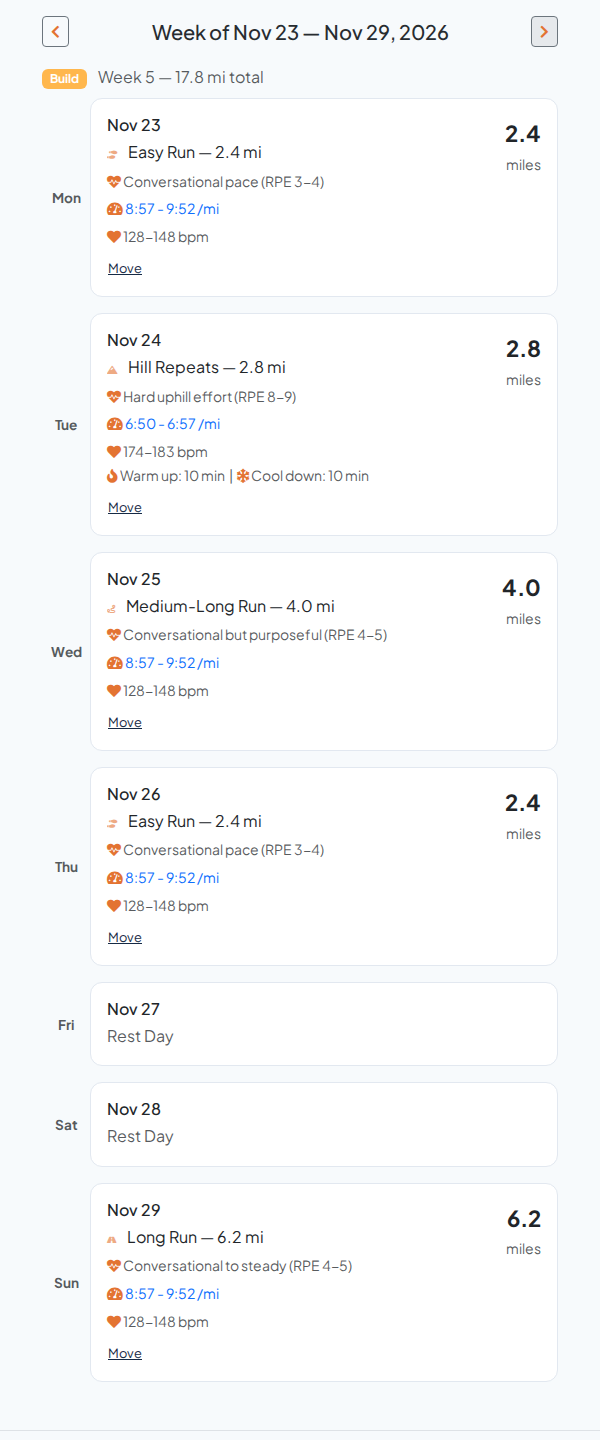
The colour bug is gone for a plain reason. There is no second copy of the colours to get wrong. Whatever the app draws is what the homepage shows.
What stops it breaking
A live screenshot can still go wrong in two quiet ways. The site can ask for a name that nothing captures, and the CDN answers 404. Or the site can reserve a box of the wrong size, and the page jumps when the image arrives. Neither fails a build on its own, so Pheidi added a test that does.
ScreeneryManifestTests reads the capture calls in the test code and the entries in screenshots.js, and fails if they disagree. A name in the list that no test captures fails it. So does a capture size that doesn't match the size the list promises. The calendar change taught it to read the new crop calls too, and added one more check, that the crop sizes in the test match the crop: sizes in the list. To make sure the new check worked, we planted a 1px mismatch, watched it fail, and put it back.
The names themselves are treated like published URLs. Renaming plan/today wouldn't move the screenshot. It would make a new one and leave every page that asks for the old name showing a broken image.
Doing this on your own site
What carried over from Pheidi, in the order we'd do it again:
- Take the pictures in the tests you already run. If your end-to-end suite signs in and seeds data, a screenshot is one more line. Screenshot automation shows the Playwright version.
- Keep one list of names, alt text and sizes, and have the site read it. Then a test can check the list against the captures, and nobody pastes a URL by hand.
- Put the width and height in the list, not in the page. Pheidi's are fixed per capture, so the browser reserves the right box before the image arrives and the page doesn't move.
- When the thing you want to show is taller than a screen, capture a fixed band and fail the test if the subject doesn't fit. Don't measure the element and publish whatever size comes out, or every content change becomes a layout shift on your homepage.
- Delete the mockup. A hand-drawn version of your UI is a second copy of it, and second copies drift.
Pheidi's homepage now shows the app as it was this morning. Nobody has to remember to make that true.
FAQ
- Does a pull request change the screenshots on Pheidi's live site?
- No. A pull request's screenshots go to that pull request's own channel for review. Only the build on master moves @latest, and @latest is what the marketing site asks for. The rules are in How @latest moves.
- Can Screenery resize the image for a smaller column?
- Not yet. Screenery serves the PNG it stored, and a resize parameter such as ?w=640 answers 501 not_implemented. Pheidi asks for the stored image and lets CSS scale it. For the calendar crop it captures at about the width of the column instead.
- What happens between the merge and the first master build?
- A brand-new screenshot name answers 404 until the first build on master publishes it, about 15 minutes for Pheidi. The marketing site can deploy first. A screenshot that already exists keeps showing the previous build until the new one lands.
- Is the data in the screenshots real?
- It is real output from the app, run against seeded test accounts. The plan in each picture comes from Pheidi's own plan generator, so when the generator changes, the pictures change with it.